EduPay and BPS Tes Universal Account FAQs
TABLE OF CONTENTS
General
As part of Tes, EduPay and BPS are introducing Tes Universal Account, a small change to the way you log in to your account. This document explains how it works, what to expect, and how to get help if needed.
What is Tes Universal Account?
Tes Universal Account is a single login linking all your Tes products, including EduPay and BPS. It's more secure, easier to manage, and means only one username and password to remember. You may already have a Tes Universal Account if you use other Tes products, in which case you can link it up to EduPay and BPS. If you don’t already have a Tes Universal Account, you will be asked to create one
What’s changing?
When Universal Accounts are activated for your school, you’ll start to notice these changes (until then you’ll continue logging into EduPay and BPS as usual). You can be sure your EduPay and BPS data, features, and user experience will stay the same.
Will Universal Accounts be activated for all EduPay/BPS customers at the same time?
No. To make sure everything is working smoothly we’ll do a phased roll-out across EduPay/BPS schools. This process will start at the beginning of December. For the first few customers, users who have an email address as their username will be taken through the process first. We’ll then start asking the other users to update their email address so a Universal Account can be created for them.
When will I need to create a Tes Universal Account or link my existing account?
Once the process is activated for your school, you will be taken through the journey to create or link a Tes Universal Account when you next log in. If your username is an email address, we’ll check to see if that email is linked to an existing Universal Account. If so, we’ll ask you to confirm your existing Universal Account password and link EduPay or BPS to it. If not, you’ll be taken through the process to create a Universal Account.
What if my username is not an email address?
If your EduPay or BPS username is not an email address you will be asked to provide an email. You’ll then be taken through the process described above, to create a new Account or link EduPay/BPS to an existing one.
Why do I need to use an email address as a username?
Because your email address can be common across all the Tes products that you subscribe to, whilst your username will be different for each product. I use both EduPay and BPS.
Will I need to go through the same process in both?
Yes. However, if you have an existing Universal Account you’ll just need to confirm that password when logging into EduPay or BPS. If you create a new Universal Account when signing into EduPay you’ll just be asked to confirm your Account password after you have next signed into BPS, and vice versa. After that you can use the same username and password to sign into both products.
Will I need to change my password?
If you have an existing Universal Account, then No. Once EduPay/BPS is linked you’ll use your Universal Account password to sign in going forward. If you have a new Universal Account created for you, you may be asked to change your existing EduPay/BPS password if it does not meet the Tes criteria. This will all be explained as you go through the process.
Do I have to use a Tes Universal Account?
Yes, all eligible users of EduPay and BPS will be required to create a Tes Universal Account or link to an existing account.
Who isn’t an eligible user?
For the time being, users who work across multiple different MATs will be excluded from the process. We’ll be in touch with these users a little later to explain how you will create a Universal Account.
Can I create a Universal Account when logging into the EduPay MobileApp?
Yes, users will go through the same process regardless of whether they are logging in via the website or App.
Does Tes Universal Account have any associated costs?
There is no additional cost to use Tes Universal Account.
Can I use Multi Factor Authentication (MFA) when logging in?
If you have configured EduPay to require users to enter an emailed OTP, or use an Authentication App, when logging in this will continue as it is now.
Will this affect my data or any integrations I have?
No — this is purely a login experience change.
How do I know what other Tes products use Tes Universal Account?
Most products under the Tes brand have Tes Universal Account capability. To see which products are available check the website for that product.
How can I tell if I have already use Tes Universal Account in another product?
You won’t be able to tell, but if you think you have set up Tes Universal Account in another Tes product, use that email address when setting up your Tes Universal Account in Engage.
The email address I have as my username in EduPay or BPS is different to the one I already use for Tes Universal Account. What should I do?
The easiest solution is to ask your EduPay/BPS Administrator to update your username to your Universal Account email before you sign in. You’ll then be asked to confirm your Universal Account password when you next log into EduPay/BPS so it can be linked. If you do end up with 2 different Tes Universal Accounts with different emails, you can raise a support ticket and we can merge the accounts using your preferred email address.
Technical Questions Why hasn't it been switched on for me yet?
This will be a gradual roll-out which won't affect all schools straight away and some users might not be eligible to be migrated.
How are credentials transmitted to the Tes Universal Account API?
Communication to the Tes Universal Account API is transmitted by a secure HTTPS connection using SSL certificates.
What happens if there is a communication issue between EduPay or BPS and Tes Universal Account?
For users that have a Tes Universal Account, this will cause the login to fail. Users will be warned onscreen that they can’t login. These issues will affect all users so should be fixed very quickly. If the problem lasts for more than a few minutes, please raise a Support case.
Password and User Management
How do I change my password?
The process to change your password in EduPay and BPS has not changed. If these products are linked to your Universal Account, you’ll need to use the new password when logging in to all other linked Tes products.
If you need to create or reset a password in EduPay or BPS after you have migrated these products to your Universal Account you will need to meet the new Tes criteria:
- The password must be at least 12 characters long
- It must not contain any leading or trailing spaces
- It cannot include 5 or more repeating or consecutive characters. Eg passwords including the following would not be valid:
- 12345
- 11111
- ABCDE
- BBBBB
- QWERTY
When linking EduPay or BPS to an existing Universal Account you will be asked to confirm your UA password:
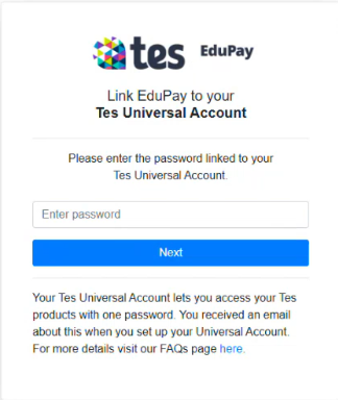
If you have forgotten what this is you will need to reset your Universal Account password in an already-linked product. If you are unsure which product(s) are already linked, enter any text in the ‘Enter password’ field shown above. The screen will then update to show your other linked products. If necessary, you can then reset your password in one of those products.
What if I forget my password?
The process to reset a forgotten EduPay and BPS password has not changed. You’ll be asked to provide your username from the login screen and a password reset email will be sent. Similar to changing your password, if the product you are resetting your password in is linked to your Universal Account you’ll need to use your new password in all other linked Tes products.
Can I still change my username?
The process to change your username in EduPay or BPS has not changed. The only difference is that your username always has to be an email address. When you set a new username we’ll check to make sure it’s not used by anyone else, then send an OTP to the new address to ensure you have access to it. Once you enter your OTP on screen we’ll update your username. If EduPay/BPS are linked to your Universal Account, you’ll need to use the new username when logging in to all other linked Tes products.
How do I set up new users for EduPay or BPS?
The creation of users in EduPay or BPS hasn’t changed. However, new EduPay users will no longer get the option to change their username when they first log in. They will be asked to create or link to a Tes Universal Account.
What can I do if I don’t have an email address?
An email address will be required to login to the Engage products that use Tes Universal Account.
What happens when a user locks their account?
The EduPay/BPS administrator at your school will be able to unlock the account as normal.
Can a user delete their Tes Universal Account?
No, Tes Universal Accounts cannot be deleted or unlinked once created.
Can an EduPay/BPS Administrator disable Tes Universal Accounts?
No, the Administrator cannot disable Tes Universal Accounts or prevent a user from creating one.
They can still make users inactive in EduPay or BPS if they leave. GDPR For information on GDPR and data policies please refer to: https://www.tes.com/en-au/policies/overview https://www.tes.com/en-gb/policies/overview
Was this article helpful?
That’s Great!
Thank you for your feedback
Sorry! We couldn't be helpful
Thank you for your feedback
Feedback sent
We appreciate your effort and will try to fix the article