Timesheets (Support Staff)
Step 1: Take the Pay scale salary (not prorated)
Step 2: Divide by the maximum weeks in a year (set by the location)
(Commonly 52 or 52.143)
Step 3: Then divide by the maximum number of job hours on the role
(Commonly 32.5 or 37 hours)
Full Formula: Pay scale salary (not prorated) / maximum weeks in a year (set by the location) / maximum number of job hours on the role = hourly rate.
Timesheets (teaching staff)
Teaching staff timesheet rates are calculated based on the Settings set in Edupay.
To check click the MAT/School at the top of Edupay --> Settings
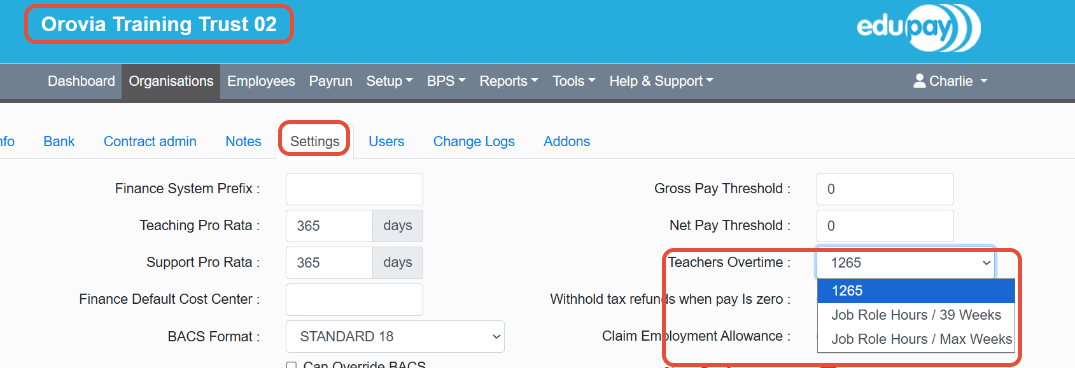
Depending on which method is selected the below formulas apply.
1) 1265 Method : Pay scale salary (not prorated) / 1265 = hourly rate.
2) Job Role / 39 Weeks Method: Pay scale salary (not prorated) / 39 weeks / maximum number of hours on the role = hourly rate.
3) Job role/ Max weeks Method: Pay scale salary (not prorated) / maximum weeks in a year (set by the location) / maximum number of hours on the role = hourly rate.
Was this article helpful?
That’s Great!
Thank you for your feedback
Sorry! We couldn't be helpful
Thank you for your feedback
Feedback sent
We appreciate your effort and will try to fix the article